

Online Menu
This project is publicly accessible. Click to access.
Published:
9 minute read
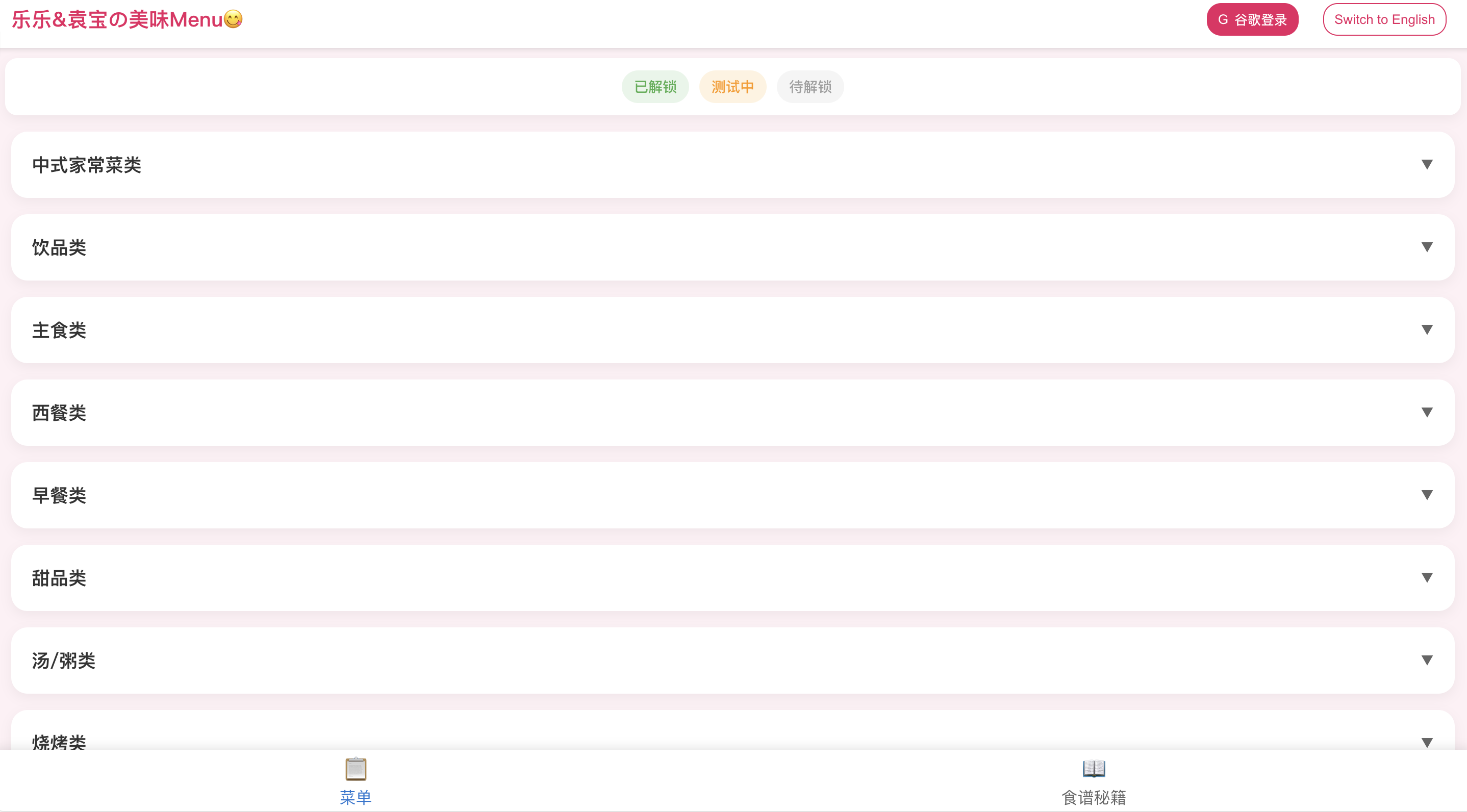
Online Menu: Category hierarchy (Chinese)
In One Sentence
Online Menu is a bilingual family recipe website I built and deploy myself — browse dishes in English or Chinese, track which recipes are mastered vs aspirational, view cooking tips and sauce formulas, and admins edit everything in the browser without a third-party CMS.
The Problem
Household menus lived in scattered notes and chat messages. Bilingual families need both languages in one place. Recipes evolve over time — a static document goes stale. There was no fun way to track which dishes we had actually mastered vs still wanted to try.
Six Core Capabilities
1. Bilingual by Design — Not Bolted On
Pain point: Translation is usually an afterthought — English UI with Chinese content pasted in, or vice versa.
What Online Menu does:
- Dual-language data model: every text field stored as
{ en: string, zh: string }— dish names, notes, category names, subcategory names, ingredient descriptions, sauce recipes. - One-tap language toggle in header — switches entire UI chrome and all content simultaneously.
- Localized chrome: title bar, loading text, buttons, modals, status labels, bottom nav, confirm dialogs all switch with active language.
- Bilingual edit forms: side-by-side CN/EN inputs; both names required on save with validation errors in active language.
- Multiline bilingual fields: dish notes, ingredient descriptions, sauce recipes use paired textareas with
pre-wrapline break preservation. - Pinyin-based ID generation: new items get IDs like
dish_{pinyin}_{uuid}using thepinyinlibrary on Chinese names — human-readable slugs in Firestore.
2. Dish Status Game — Unlock, Test, Lock
Pain point: A flat list of recipes does not reflect the family's cooking journey — some are mastered, some are experiments, some are aspirational.
What Online Menu does:
- Three status states with colour-coded visual encoding:
| Status | EN | CN | Meaning | Colour |
|---|---|---|---|---|
unlocked | Unlocked | 已解锁 | Mastered family favourite | Green |
testing | Testing | 测试中 | Work in progress | Orange |
locked | Locked | 待解锁 | Not yet tried / aspirational | Gray |
- Status legend banner at top of Menu tab — all three badges visible with localized labels.
- Dish chips use status-coloured background, border, and shadow — scannable at a glance.
- Sort order: unlocked → testing → locked within each subcategory.
- Default: new dishes start as
locked; admin changes via dropdown in edit form. - Detail modal shows status badge next to dish title alongside emoji and rating.
3. Category Hierarchy & Dish Cards
Pain point: A long flat list of dishes is hard to browse in the kitchen; categories need to match how a real menu is organised.
What Online Menu does:
- Three-level hierarchy: Category (accordion) → Subcategory (heading) → Dish chips — derived at runtime by grouping flat
dishesarray oncategoryId. - Expandable category accordion with chevron rotation animation; subcategory headings within each category.
- Dish chips: pill-shaped buttons showing name + optional emoji + optional star rating (⭐ with numeric score; "分" suffix in Chinese).
- Dish detail modal: full name, emoji, rating, status badge, bilingual notes section.
- Admin dish CRUD:
- Global "Add Dish" button
- Per-category ➕ and per-subcategory ➕ (pre-fills context)
- Edit / delete from detail modal with confirmation
- Category assignment via dropdown of existing categories; subcategory via free-text bilingual fields (typing new subcategory creates it on save)
- Post-save UX: auto-scroll to saved dish with 3-second orange highlight pulse.
- Category migration: moving a dish updates local state — removes from old group, adds to new, auto-expands target category.
4. Recipe Secrets Tab — Tips & Sauces
Pain point: Cooking knowledge is not just dish names — ingredient prep tips and sauce formulas are separate knowledge that gets lost.
What Online Menu does:
- Two collections on Recipe tab (📖 食谱秘籍):
- Ingredient Tips (
ingredient_tips) —{ id, name, description }bilingual; cooking advice and prep notes. - Sauce Recipes (
sauce_recipes) —{ id, name, recipe }bilingual; step-by-step sauce formulas.
- Ingredient Tips (
- Card list display with title + body; line breaks preserved via
pre-wrap. - Admin CRUD per section: ➕ add, edit button, 🗑️ delete on each card; shared edit modal for create/update.
- Bottom navigation switches between Menu and Recipe tabs — fixed 60px bar with emoji icons.
- Full REST: GET all, POST create, PUT update, DELETE for both collections.
5. Google OAuth Admin — CMS Without a CMS
Pain point: Updating a family menu should not require editing JSON files or paying for a headless CMS subscription.
What Online Menu does:
- Public read access for all visitors — no login required to browse.
- Google Sign-in via Firebase Authentication popup (
signInWithPopup+GoogleAuthProvider). - Admin verification: after auth, frontend fetches
GET /api/adminsand compares signed-in email against Firestoreadminscollection allowlist. - Admin indicator: crown emoji (👑) next to sign-out button when admin.
- Gated editing UI:
isAdmincontrols visibility of all add/edit/delete buttons — non-admin signed-in users see the same read-only view as anonymous visitors. - In-browser CRUD: all edits via modal forms; changes POST/PUT/DELETE through Express API → Firestore; local React state updated immediately after save.
- No third-party CMS — the React app itself is the content management interface.
6. Mobile-First Kitchen UX & Deployment
Pain point: Recipes are used on a phone in the kitchen — desktop-first layouts fail on small screens.
What Online Menu does:
- Mobile-first design: pink/white theme (
#fff0f5background,#e91e63accent); fixed title bar + bottom nav; content padding adjusts for title bar height (56px desktop / 96px mobile). - Responsive title bar: single row on desktop, two-row stack on mobile (<600px).
- Modal system: overlay modals for dish detail, dish edit, ingredient/sauce edit (z-index 1000).
- Micro-interactions: hover lift/scale on cards/chips/buttons, staggered fade-in on accordion expand, highlight animation after save.
- Parallel data fetch on mount — dishes, ingredient tips, sauce recipes, and admin list loaded simultaneously via Axios.
- Deployment stack:
- Frontend: React 19 on GitHub Pages at
jacky-info.com/menuv2/(CRAhomepage+gh-pagesdeploy; GitHub Actions CI on push). - Backend: Express 5 on Vercel (
backend-five-tau-19.vercel.app/api). - Database: Firebase Firestore via Firebase Admin SDK (local service account or env vars).
- Auth: Firebase Auth (Google) client-side only.
- Frontend: React 19 on GitHub Pages at
Real-World Impact
Used daily at home. Demonstrates full-stack delivery — bilingual i18n, OAuth admin gating, Firestore CRUD, and public HTTPS deployment on personal domain without third-party CMS costs.
Skills Demonstrated
| Area | What this project shows |
|---|---|
| Full-stack | React 19 + Express 5 + Firebase Firestore |
| i18n | { en, zh } data model + one-tap UI toggle |
| Auth | Google OAuth, email allowlist admin gating |
| CMS-like admin | In-browser CRUD without third-party CMS |
| Deployment | GitHub Pages + Vercel + Firebase, HTTPS on personal domain |
How It Works (Plain English)
- Visitors browse menu or recipe tab in preferred language — no login needed.
- Admin signs in with Google → crown appears → add/edit/delete buttons visible.
- Edit dish, tip, or sauce in modal → save → Express API writes to Firestore → UI updates immediately.
- Status colours and sort order reflect family's cooking progress at a glance.
Architecture
┌──────────────────────────────────────────────┐
│     React Web App (GitHub Pages · HTTPS)      │
│  Menu · Recipes · EN/CN toggle · Admin modals │
└─────────────────────┬────────────────────────┘
                      │ Axios REST
         ┌────────────┼────────────┐
         ▼            ▼            ▼
  ┌────────────┐ ┌─────────┐ ┌──────────────┐
  │ Express API│ │Firestore│ │ Google OAuth │
  │  (Vercel)  │ │ dishes  │ │  (Firebase)  │
  │            │ │ tips    │ │              │
  │            │ │ sauces  │ │              │
  │            │ │ admins  │ │              │
  └────────────┘ └─────────┘ └──────────────┘
Tech Stack
- Frontend: React 19, TypeScript, Create React App, Context API (Auth + Language), Axios, UUID, Pinyin
- Backend: Node.js, Express 5, Firebase Admin SDK, dotenv, CORS
- Auth: Firebase Authentication (Google Sign-in)
- Database: Firebase Firestore
- Deploy: GitHub Actions → GitHub Pages (frontend); Vercel (API)
Our family's menu, online and bilingual.