

Easy Life Agent — merged into Jacky AI Agent
This is a private project. If you would like to learn more details, access the source code, or experience the project, please contact jacky.
Published:
8 minute read
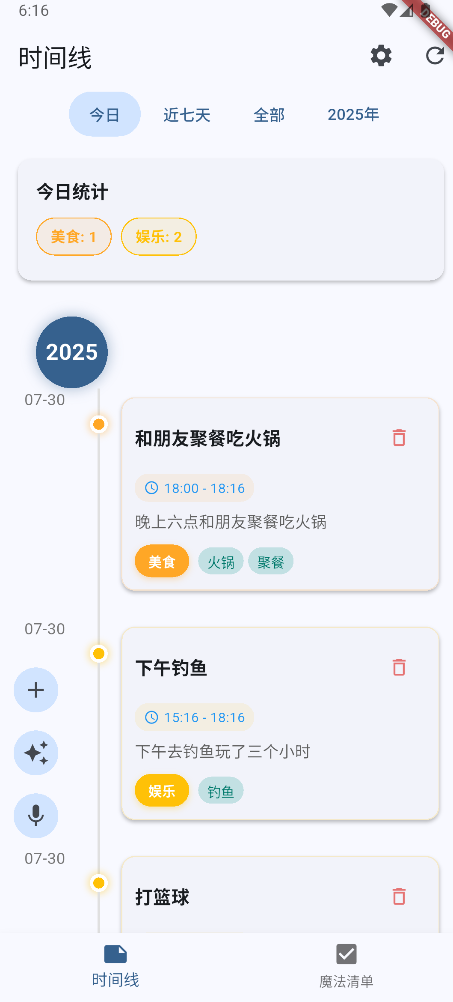
Easy Life Agent: Timeline diary and Magic List todos — AI-powered capture with tags and categories
In One Sentence
Easy Life Agent combines diary and todo list in one phone app — write, speak, or paste a note, and AI adds titles, tags, categories, and timestamps automatically. Everything stays on your device unless you choose to sync.
The Problem
Diary apps and todo apps are separate, and both expect you to organise manually — pick a category, write a title, set a date. Capturing a thought takes longer than having it. Cloud-first apps raise privacy concerns for personal journals. I wanted one capture surface where AI handles the filing and data stays local.
Seven Core Capabilities
1. Dual-Mode Interface — Past vs Future
Pain point: Life events (past) and tasks (future) live in different apps with different mental models.
What Easy Life Agent does:
- Timeline (时间线) — visual chronological diary for past events:
- Vertical timeline with year markers and date nodes
- Entry cards showing AI-generated title, time range, full description, and colour-coded tags
- Time filters: Today · Last 7 days · All · Year (e.g. 2025年)
- Daily statistics card (今日统计) — category breakdown with counts
- Magic List (魔法清单) — future-task mode:
- Todo items with importance rating and planned days
- Checkbox completion flow separate from timeline entries
- Seamless bottom-nav switching between past and future views.
- Unified search across both modes — one query finds timeline notes and todos.
2. AI Auto-Organisation — Five LLM Providers
Pain point: Manual tagging and categorisation kills the capture flow; vendor lock-in to one AI provider is risky.
What Easy Life Agent does:
- Five configurable LLM backends:
- OpenAI
- Anthropic Claude
- Google Gemini
- Baidu Qianfan (千帆)
- Zhipu AI (智谱)
- Per-provider API key and model selection in Settings.
- AI extraction pipeline from free text:
- Title (concise, descriptive)
- Category (broad bucket)
- Tags (granular labels)
- Date/time (datetime parsing from natural language)
- Type classification — note vs todo (during batch import)
- Language adaptation — AI output in user's preferred language (English / 中文).
- Human-in-the-loop — review and edit all AI suggestions before save; nothing auto-committed silently.
- Batch processing queue — multiple items processed sequentially without blocking UI.
3. Voice Capture
Pain point: Best thoughts happen when typing is inconvenient — walking, cooking, driving.
What Easy Life Agent does:
- Dedicated microphone FAB on timeline screen — one tap to start voice capture.
- Real-time speech-to-text via Speech-to-Text plugin with language detection.
- Voice transcript flows through the same AI extraction pipeline as typed text — title, category, tags, and datetime generated automatically.
- Dedicated voice note page for longer recordings.
- Reduces capture friction from "open app → navigate → type → categorise" to "tap mic → speak → confirm".
4. Batch Import — Paste Once, Split Many
Pain point: Importing a long journal entry, meeting notes, or chat log as one block makes it unsearchable.
What Easy Life Agent does:
- Batch creation — paste long text; AI splits into multiple timeline notes or todos based on content structure.
- Each split item gets its own title, category, tags, and datetime.
- Batch processing queue handles multiple AI requests in sequence.
- Useful for migrating old journals, importing meeting transcripts, or processing exported chat logs in one shot.
- AI determines whether each segment is a past event (timeline) or future task (todo).
5. Local-First Privacy — Hive on Device
Pain point: Personal diary data on someone else's server is uncomfortable; account requirements add friction.
What Easy Life Agent does:
- Hive NoSQL database stored entirely on device — no account required for core functionality.
- No mandatory cloud — optional cloud sync is user-controlled, not the default.
- Export / backup support for data portability.
- Data model: entries with title, description, time range, category, tags, and type (timeline vs todo).
- Privacy story: your thoughts stay on your phone unless you explicitly opt into sync.
6. Categories, Tags & Daily Analytics
Pain point: Without structure, a timeline becomes an unreadable scroll; without analytics, you cannot see patterns in your life.
What Easy Life Agent does:
- AI-powered automatic categorisation — broad buckets (美食, 娱乐, 工作, etc.) assigned on every entry.
- Granular tags beyond category (火锅, 聚餐, 钓鱼, etc.) with colour-coded chips.
- Customisable category list in Settings — add/remove/rename categories.
- Daily statistics card on timeline — category breakdown with counts for Today / Last 7 days views.
- Advanced filtering and sorting by time range, year, category, and tags.
- Full-text search across timeline and todos simultaneously.
- Intelligent tag extraction — AI generates relevant tags; user can edit before save.
7. Quick Capture — Widget, Templates & Deep Links
Pain point: Opening the full app to capture one thought is too slow; repetitive entry types (meals, workouts) need shortcuts.
What Easy Life Agent does:
- Home screen widget — capture a note without opening the full app; reduces "capture in seconds" to literal seconds.
- App links / deep linking — open app directly to specific flows from external links.
- Template system — reusable patterns for common entry types (meals, workouts, meetings) with pre-filled category/tag hints.
- Three FABs on timeline:
- + — manual entry
- ✨ — AI-assisted quick capture
- 🎤 — voice input
- Settings panel: AI provider keys, language preference, custom categories, model selection per provider.
Real-World Impact
Early AI productivity experiment (Feb 2025 – present). Validated the core insight that AI reduces capture friction — the same principle carried forward into KnowFlow (knowledge capture pipeline) and Jacky AI Agent (scheduling, memos, and RAG notes).
Skills Demonstrated
| Area | What this project shows |
|---|---|
| Mobile | Flutter 3, Material Design 3, Provider, home widget, app links |
| AI integration | 5 LLM providers, batch queue, bilingual output, human-in-the-loop |
| Privacy design | Local-first Hive storage, optional sync, no account required |
| Speech | Speech-to-Text, voice note page, language detection |
| UX | Dual-mode timeline/todo, batch import, daily category analytics |
How It Works (Plain English)
- You type, speak, widget-capture, or batch-paste content.
- AI extracts title, category, tags, and datetime; you review and edit.
- Save to local Hive database — no network required for core use.
- Browse timeline (past events) or magic list (future todos).
- Filter by date, category, or tags; search across both modes.
Architecture
┌─────────────────────────────────────────────┐
│           Flutter Mobile App                 │
│  ┌─────────────┐  ┌─────────────────────┐  │
│  │  Timeline   │  │  Magic List (Todos)  │  │
│  │  (past)     │  │  (future)            │  │
│  └──────┬──────┘  └──────────┬──────────┘  │
│         │    Voice · Batch · Widget · AI    │
└─────────┼────────────────────┼──────────────┘
          ▼                    ▼
  ┌───────────────┐    ┌───────────────────┐
  │  Hive (local)  │    │  AI APIs (optional)│
  │  NoSQL on device│    │  OpenAI·Claude·…  │
  └───────────────┘    └───────────────────┘
Tech Stack
- Framework: Flutter 3.0+, Material Design 3, Provider state management
- Database: Hive NoSQL (local-first)
- AI: OpenAI, Anthropic Claude, Google Gemini, Baidu Qianfan, Zhipu AI
- Speech: Speech-to-Text plugin with language detection
- Extras: Home screen widget, app links, batch processing queue, template system
Capture life in seconds — let AI handle the filing.